A gate, not a notification
Solix holds every sensitive tool call and shows you the exact command or code diff before it runs — approve or deny in one keystroke. Never a blind yes/no.
Launch and govern a fleet of Claude Code agents from one tab. Solix holds every sensitive tool call until you approve it, runs each task in its own git worktree, and stops a run that blows past its budget cap — all on your machine.
Then run solix demo — a full synthetic galaxy in ~10 seconds, no setup.
MIT licensed·Node ≥ 20·Works with any recent Claude Code
Coming next · Codex support
The same galaxy, with OpenAI Codex sessions as planets alongside Claude Code — and Maestro: describe a goal and watch your agent fleet build it, with a plan you approve first (in development).
See what ships today
// Views
The galaxy is your at-a-glance overview — every agent, its status, and what needs you. Press V for the dense List view: a sortable table of every agent with status, cost, context %, and health, plus one-click actions. A map for the fleet; a compact board for heads-down work.
agent · status · cost · context % · health
// Not a dashboard
The galaxy is the interface — underneath it is a control plane that holds risky tool calls, isolates each task, and enforces the budget you set. All of it locally.
A real Claude Code hook, not a notification. The tool call is held until you answer — nothing sensitive runs behind your back and nothing is logged after the fact.
Every task Solix launches gets its own worktree, so parallel agents never step on each other's files or on the branch you're working in.
Set a per-task cap and Solix enforces it: warn as the ring goes amber, pause the run when it hits the ceiling. Spend is a control, not a chart.
Solix wraps the session instead of tailing it — so you can send input back into a live agent straight from the browser, not just watch it scroll.
Your existing agent definitions are read in as-is. No second config, no duplicated prompts — the crew you already have shows up in the galaxy.
// The problem
Engineers now run 3–5 Claude Code sessions across different terminal tabs with no shared visibility — no idea which one is blocked on a permission, burning budget, or done. Solix is the missing mission control.
Five terminals open, zero idea which one is mid-build, mid-prompt, or stuck on a permission.
You can't tell which agent is approaching its context limit until it derails.
Opus runs quietly burn budget while you're switching windows. No alerts, no cap.
// Legend
Every Solix concept maps to something you already see in the sky.
You / mission control
→ Sun
Claude Code session
→ Planet
Subagent (Task tool)
→ Moon
Built-in advisor
→ Inner crew-ring planet
Skill
→ Asteroid in the belt
Tool call
→ Comet streak
Awaiting permission
→ Red pulsing flare
Context usage
→ Planet size
Model
→ Planet color
Cost vs budget
→ Budget ring
Shared goal
→ Constellation lines
// How it works
solix init onceSolix wires itself into Claude Code's hooks so it can see sessions the moment they start. No extension, no account, no cloud project.
Full install guidenpm i -g @shmulikdav/solixsolix init# wires the Claude Code hooksKeep launching Claude Code from whatever terminal you like — any number of tabs, any model. The galaxy, Mission Control and the advisor panel all read from the same local session data.
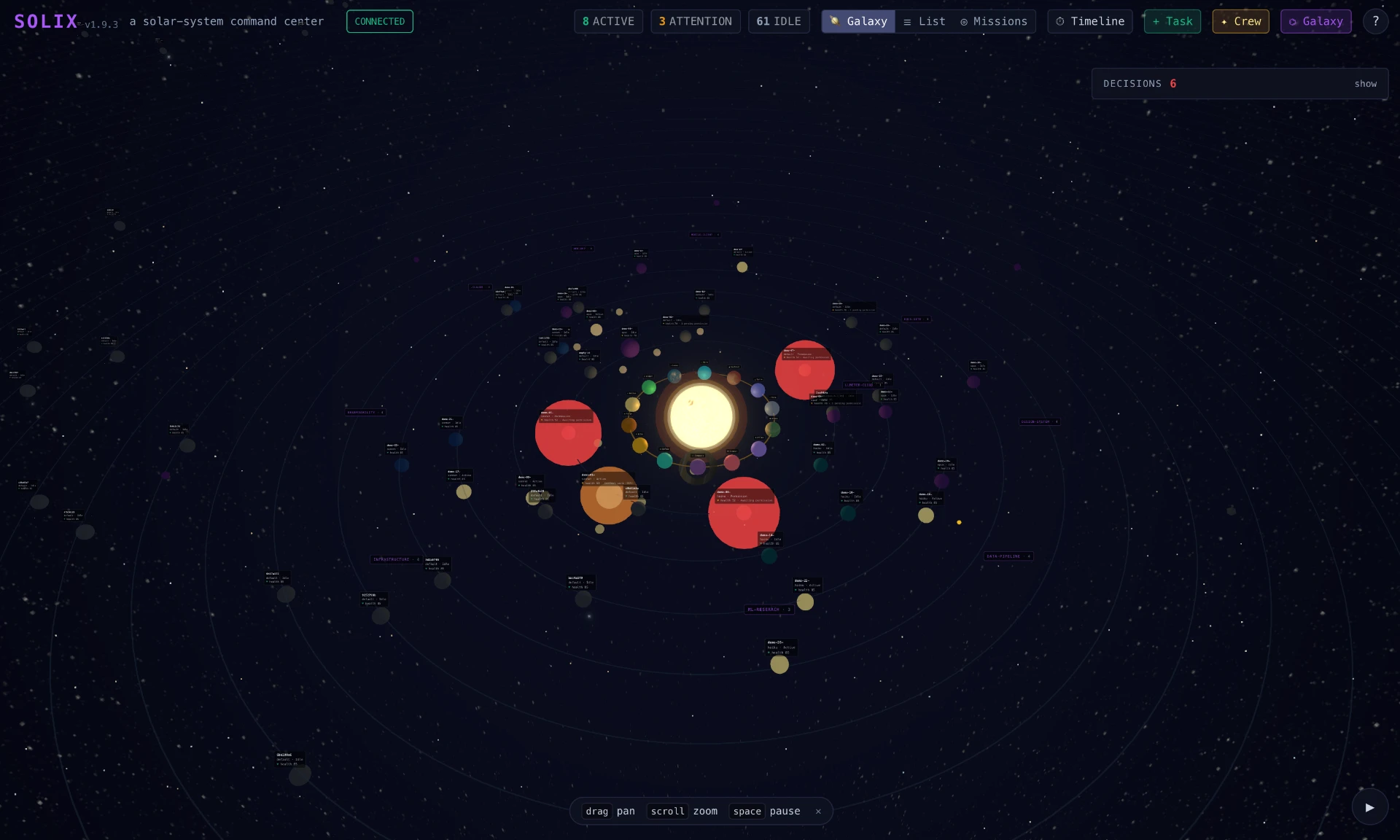
Each session becomes a planet when it starts and disappears when it ends. Ask Solix what's happening instead of reading five terminals.
solix status3 agents running · 1 awaiting approval · $0.68 spent// The payoff
Solix hooks into Claude Code before the tool runs, so the whole chain is visible — which agent, which tool, what it wants — and execution stays frozen until you answer.
// Mission Control
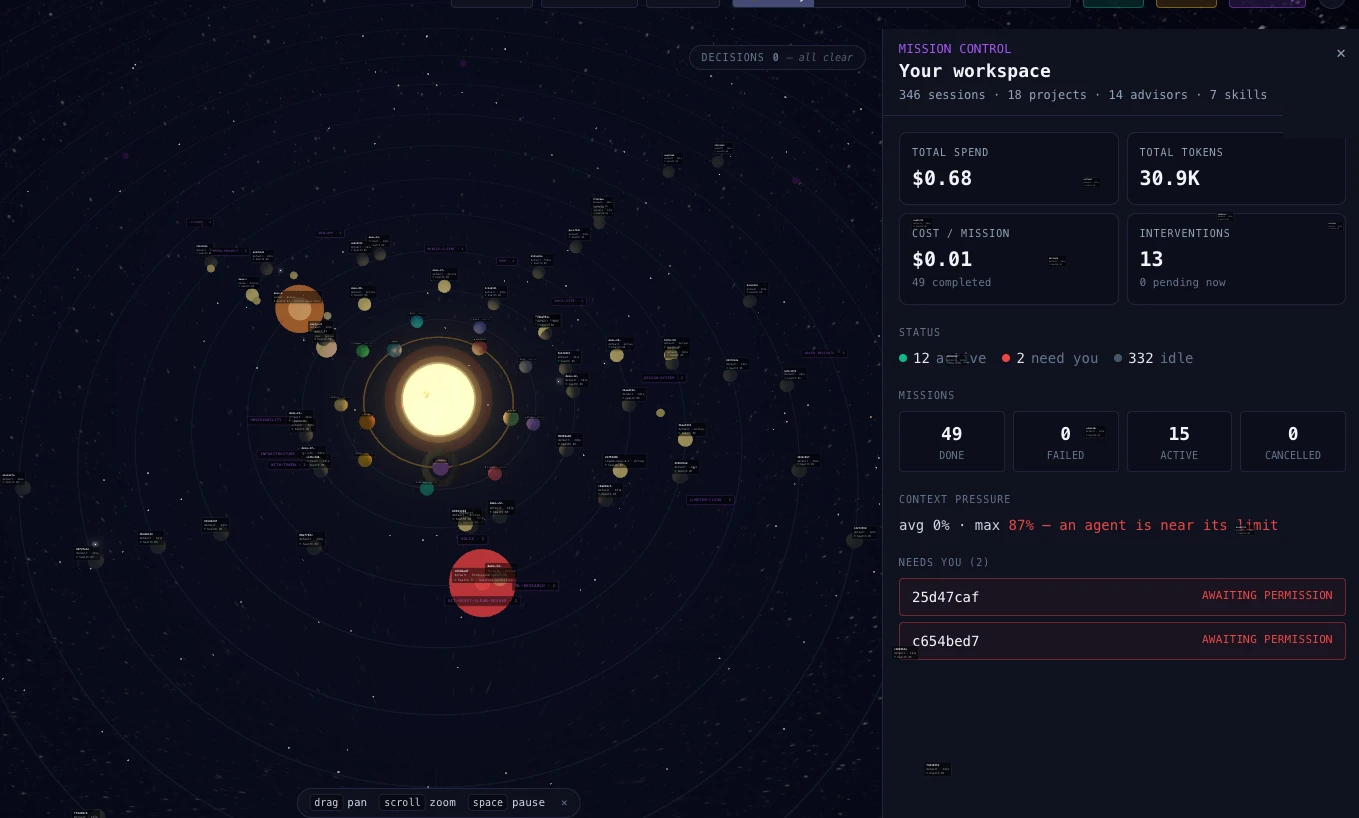
Click the sun and Solix opens Mission Control: total spend, cost per completed mission, interventions, and which agents need you — the whole workspace at a glance. 100% local, so the numbers never leave your machine.
// Cost
Live spend per agent and per task, a cost column in the List view, and a Mission Control overview (click the sun) with total spend and cost per completed mission. Set a budget cap and Solix stops a run that blows past it.
// Features
Solix holds every sensitive tool call and shows you the exact command or code diff before it runs — approve or deny in one keystroke. Never a blind yes/no.
Every planet wears a ring of live USD spend. Set a per-task cap and Solix warns at amber — then pauses the run at the ceiling instead of letting it burn.
Each task Solix launches runs in its own git worktree, so parallel agents never collide on files or branches.
Solix wraps the session, so you can send input back into a live agent from the browser — not just watch it.
Each planet shows how much context window is left, so you refactor the prompt before it derails.
Schedule recurring tasks every 30m / 2h / 1d as pulsing nodes.
Group agents under a goal; related planets link with constellation lines.
Scrub back through what every agent did, when, and why.
Your existing claude agent definitions load in as-is — no second config to maintain.
Export your advisor + skill setup as a JSON galaxy. One command to share.
Auto-syncs with Claude Code's background sessions. Zero config.
Jump between planets, approve, and mute with single keys. Never leave the keyboard.
Click the sun for a live cost + status overview of every agent — spend, cost per mission, interventions, and what needs you.
// Meet the crew
Fourteen specialist advisors — a product manager, a builder, a security auditor and more — watch your fleet and surface the things you'd miss. Five fly by default; nine more are one click away when you need them.
Enabling an advisor is free — it just joins your crew. Advisors only cost tokens when you pin one (an always-on session) or put one to work on a task — and Solix shows the spend right on each card.
Product Manager
Builder
UX/UI Designer
Code Reviewer
Security Auditor
// Why not just…
Fair question to ask. Here's the honest matrix.
| Capability | tmux / iTerm | Claude /agents | Cloud dashboards | Solix |
|---|---|---|---|---|
| Blocks the action until you approve | no | yes in that one terminal | partial | yes |
| See every agent at once | no windows, not fleet | no | yes | yes |
| Approve from one place | no | no per-session prompts | partial | yes |
| Isolated worktree per task | no | no | partial | yes |
| Send input back to a live session | yes if you find the tab | yes | no | yes |
| Context % per agent | no | partial | yes | yes |
| Cost / budget caps | no no signal | partial | yes | yes |
| Code stays on your machine | yes | yes | no sent to vendor | yes |
| Works with any Claude Code session | yes | partial | no | yes |
| Free & MIT | yes | yes | no | yes |
// Quick start
npm i -g @shmulikdav/solixsolix install# wire Claude Code hookssolix start# → 127.0.0.1:4242Just want to look around first?
Run solix demo — seeds planets, comet streaks, and a pending permission.
solix demoRequires Node ≥ 20. Claude Code is optional — solix demo runs without it; you only need Claude Code to watch your real agents. macOS, Linux, Windows.
// FAQ
// Mission control
npm i -g @shmulikdav/solixThen run solix demo — a full synthetic galaxy in ~10 seconds, no setup.